19 Joins
19.1 Introduction
数据分析很少只涉及单个数据框。 通常你会拥有多个数据框,并且必须通过连接(join)将它们合并起来,以回答你感兴趣的问题。 本章将向你介绍两种重要的连接类型:
- Mutating joins, 从另一个数据框的匹配观测中添加新变量到一个数据框。
- Filtering joins, 根据观测是否与另一个数据框中的观测匹配,从一个数据框中筛选观测。
我们将首先讨论键——用于在连接中关联一对数据框的变量。 然后通过检查 nycflights13 包中数据集的键来巩固理论,并利用这些知识开始连接数据框。 接着我们将讨论连接的工作原理,重点关注它们对行的操作。 最后,我们将讨论非等值连接——一类提供比默认相等关系更灵活的键匹配方式的连接。
19.1.1 Prerequisites
在本章中,我们将使用 dplyr 的连接函数来探索 nycflights13 中的五个相关数据集。
19.2 Keys
要理解连接,首先需要了解两个表如何通过各自内部的键对进行关联。 在本节中,你将学习两种类型的键,并查看 nycflights13 包数据集中两种键的示例。 你还将学习如何检查键是否有效,以及如果表缺少键该怎么办。
19.2.1 Primary and foreign keys
每次连接都涉及一对键:主键和外键。 主键是唯一标识每个观测的一个变量或一组变量。 当需要多个变量时,该键称为复合键。例 如,在 nycflights13 中:
-
airlines记录了每家航空公司的两条信息:其承运人代码和全称。 你可以用其两个字母的承运人代码来识别航空公司,因此carrier是主键。airlines #> # A tibble: 16 × 2 #> carrier name #> <chr> <chr> #> 1 9E Endeavor Air Inc. #> 2 AA American Airlines Inc. #> 3 AS Alaska Airlines Inc. #> 4 B6 JetBlue Airways #> 5 DL Delta Air Lines Inc. #> 6 EV ExpressJet Airlines Inc. #> # ℹ 10 more rows -
airports记录了每个机场的数据。 你可以用其三个字母的机场代码来识别每个机场,因此faa是主键。airports #> # A tibble: 1,458 × 8 #> faa name lat lon alt tz dst #> <chr> <chr> <dbl> <dbl> <dbl> <dbl> <chr> #> 1 04G Lansdowne Airport 41.1 -80.6 1044 -5 A #> 2 06A Moton Field Municipal Airport 32.5 -85.7 264 -6 A #> 3 06C Schaumburg Regional 42.0 -88.1 801 -6 A #> 4 06N Randall Airport 41.4 -74.4 523 -5 A #> 5 09J Jekyll Island Airport 31.1 -81.4 11 -5 A #> 6 0A9 Elizabethton Municipal Airpo… 36.4 -82.2 1593 -5 A #> # ℹ 1,452 more rows #> # ℹ 1 more variable: tzone <chr> -
planes记录了每架飞机的数据。 你可以用其尾号来识别飞机,因此tailnum是主键。planes #> # A tibble: 3,322 × 9 #> tailnum year type manufacturer model engines #> <chr> <int> <chr> <chr> <chr> <int> #> 1 N10156 2004 Fixed wing multi… EMBRAER EMB-145XR 2 #> 2 N102UW 1998 Fixed wing multi… AIRBUS INDUSTR… A320-214 2 #> 3 N103US 1999 Fixed wing multi… AIRBUS INDUSTR… A320-214 2 #> 4 N104UW 1999 Fixed wing multi… AIRBUS INDUSTR… A320-214 2 #> 5 N10575 2002 Fixed wing multi… EMBRAER EMB-145LR 2 #> 6 N105UW 1999 Fixed wing multi… AIRBUS INDUSTR… A320-214 2 #> # ℹ 3,316 more rows #> # ℹ 3 more variables: seats <int>, speed <int>, engine <chr> -
weather记录了起飞机场的天气数据。 你可以通过地点和时间的组合来识别每个观测,因此origin和time_hour是复合主键。weather #> # A tibble: 26,115 × 15 #> origin year month day hour temp dewp humid wind_dir #> <chr> <int> <int> <int> <int> <dbl> <dbl> <dbl> <dbl> #> 1 EWR 2013 1 1 1 39.0 26.1 59.4 270 #> 2 EWR 2013 1 1 2 39.0 27.0 61.6 250 #> 3 EWR 2013 1 1 3 39.0 28.0 64.4 240 #> 4 EWR 2013 1 1 4 39.9 28.0 62.2 250 #> 5 EWR 2013 1 1 5 39.0 28.0 64.4 260 #> 6 EWR 2013 1 1 6 37.9 28.0 67.2 240 #> # ℹ 26,109 more rows #> # ℹ 6 more variables: wind_speed <dbl>, wind_gust <dbl>, …
外键是另一个表中与主键对应的变量(或一组变量)。 例如:
-
flights$tailnum是一个外键,对应主键planes$tailnum. -
flights$carrier是一个外键,对应主键airlines$carrier. -
flights$origin是一个外键,对应主键airports$faa. -
flights$dest是一个外键,对应主键airports$faa. -
flights$origin-flights$time_hour是一个复合外键,对应复合主键weather$origin-weather$time_hour.
这些关系在 Figure 19.1 中进行了可视化总结。
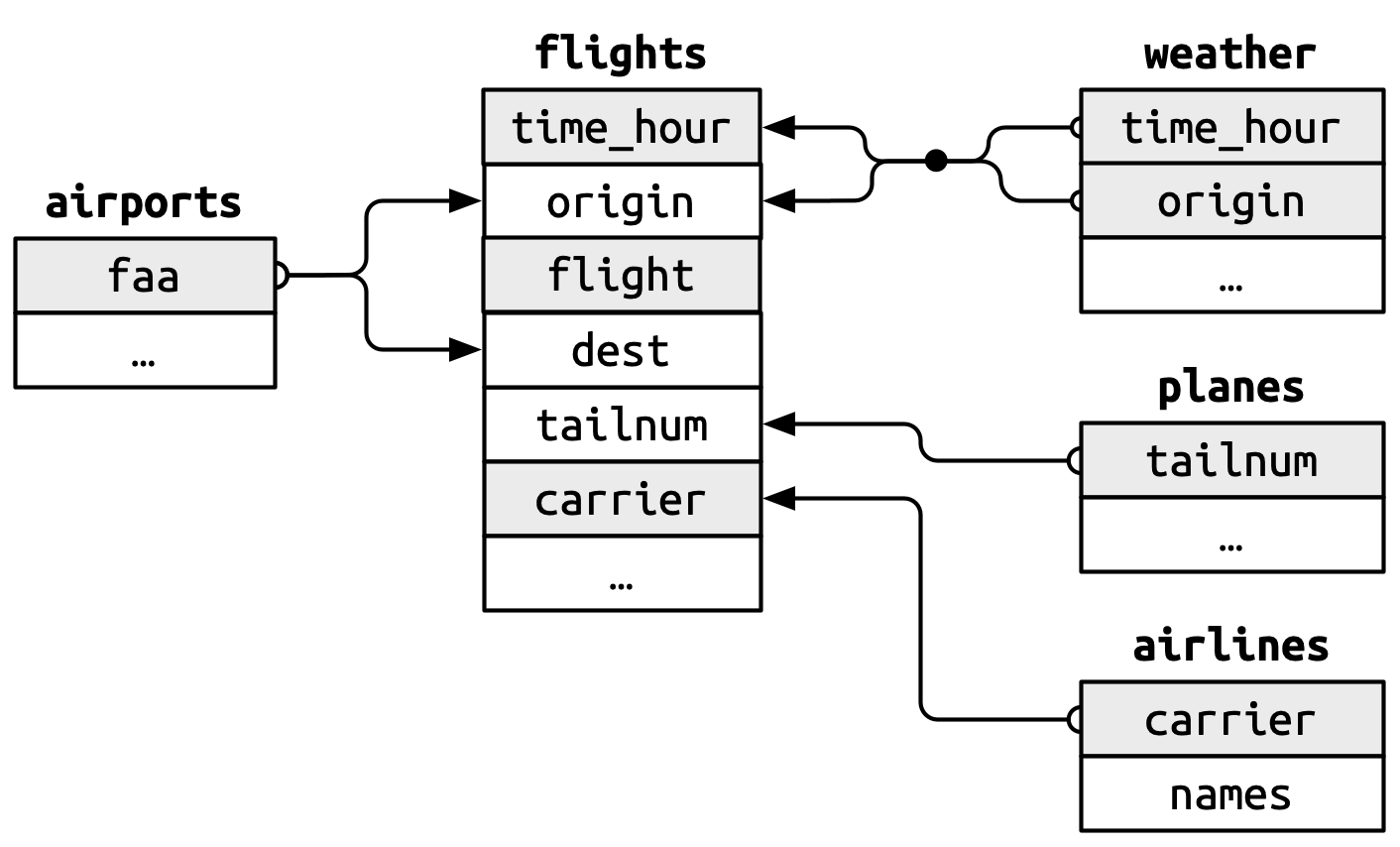
你会注意到这些键设计中的一个优点:主键和外键几乎总是具有相同的名称,这(正如你稍后将看到的)将使连接操作更加简便。 同样值得注意的是相反的关系:在多个表中使用的变量名几乎在每个地方都有相同的含义。 只有一个例外:year 在 flights 中指出发年份,在 planes 中指制造年份。 当我们真正开始连接表时,这一点将变得非常重要。
19.2.2 Checking primary keys
现在我们已经识别出每个表中的主键,最好验证它们是否确实能唯一标识每个观测。 一种方法是使用 count() 对主键进行计数,并查找 n 大于 1 的记录。 这表明 planes 和 weather 的主键情况良好:
你还应检查主键中是否存在缺失值——如果某个值是缺失的,它就无法标识一个观测!
planes |>
  filter(is.na(tailnum))
#> # A tibble: 0 × 9
#> # ℹ 9 variables: tailnum <chr>, year <int>, type <chr>, manufacturer <chr>,
#> #   model <chr>, engines <int>, seats <int>, speed <int>, engine <chr>

weather |>
  filter(is.na(time_hour) | is.na(origin))
#> # A tibble: 0 × 15
#> # ℹ 15 variables: origin <chr>, year <int>, month <int>, day <int>,
#> #   hour <int>, temp <dbl>, dewp <dbl>, humid <dbl>, wind_dir <dbl>, …
19.2.3 Surrogate keys
到目前为止,我们还没有讨论 flights 的主键。 这里它并不是特别重要,因为没有其他数据框将其用作外键,但考虑它仍然有用,因为如果我们有某种方式向他人描述观测,处理它们会更容易。
经过一些思考和试验,我们确定有三个变量共同唯一标识每个航班:
没有重复记录是否自动使 time_hour-carrier-flight 成为主键? 这当然是个好的起点,但并不能保证。 例如,海拔和纬度是 airports 的良好主键吗?
显然,通过海拔和纬度来标识机场是个糟糕的主意,而且通常仅从数据本身无法判断一组变量能否构成一个好的主键。 但对于航班来说,time_hour, carrier 和 flight 的组合似乎是合理的,因为如果同一时间空中有多个相同航班号的航班,航空公司和乘客都会非常困惑。
也就是说,使用行号引入一个简单的数值代理键可能更好:
flights2 <- flights |>
  mutate(id = row_number(), .before = 1)
flights2
#> # A tibble: 336,776 × 20
#>      id  year month   day dep_time sched_dep_time dep_delay arr_time
#>   <int> <int> <int> <int>    <int>          <int>     <dbl>    <int>
#> 1     1  2013     1     1      517            515         2      830
#> 2     2  2013     1     1      533            529         4      850
#> 3     3  2013     1     1      542            540         2      923
#> 4     4  2013     1     1      544            545        -1     1004
#> 5     5  2013     1     1      554            600        -6      812
#> 6     6  2013     1     1      554            558        -4      740
#> # ℹ 336,770 more rows
#> # ℹ 12 more variables: sched_arr_time <int>, arr_delay <dbl>, …
代理键在与他人沟通时特别有用:告诉某人查看航班 2001,比说查看 2013年1月3日上午9点起飞的 UA430 航班要容易得多。
19.2.4 Exercises
我们在 Figure 19.1 中忘记了绘制
weather和airports之间的关系。 它们的关系是什么?在 图中应该如何表示?weather只包含纽约三个起飞机场的信息。 如果它包含美国所有机场的天气记录,那么它会与flights建立什么额外的连接?year,month,day,hour和origin这些变量几乎构成了weather的复合键,但有一个小时存在重复观测。 你能找出那个小时有什么特殊之处吗?我们知道一年中有些特殊日子(例如平安夜和圣诞节)的乘客数量比平时少。 你如何将这种数据表示为一个数据框? 主键会是什么? 它将如何与现有的数据框连接?
绘制一张图说明 Lahman 包中
Batting、People和Salaries数据框之间的连接关系。 再绘制另一张图展示People,Managers,AwardsManagers之间的关系。 你如何描述Batting,Pitching和Fielding数据框之间的关系?
19.3 Basic joins
现在你已经理解了数据框如何通过键连接,我们可以开始使用连接来更好地理解 flights 数据集。 dplyr 提供了六个连接函数:left_join(), inner_join(), right_join(), full_join(), semi_join() 和 anti_join()。它 们都有相同的接口:接收一对数据框(x 和 y)并返回一个数据框。 输出中的行和列顺序主要由 x 决定。
在本节中,你将学习如何使用一个变异连接 left_join() 以及两个筛选连接 semi_join() 和 anti_join()。 下一节你将详细了解这些函数的工作原理,以及剩余的 inner_join(), right_join() 和 full_join()。
19.3.1 Mutating joins
变异连接(mutating join)允许你合并两个数据框的变量:它首先通过键匹配观测,然后将变量从一个数据框复制到另一个。 与 mutate() 类似,连接函数会将变量添加到右侧,因此如果你的数据集有很多变量,你可能看不到新增的变量。 为了示例清晰,我们将创建一个仅包含六个变量的简化数据集1:
flights2 <- flights |>
  select(year, time_hour, origin, dest, tailnum, carrier)
flights2
#> # A tibble: 336,776 × 6
#>    year time_hour           origin dest  tailnum carrier
#>   <int> <dttm>              <chr>  <chr> <chr>   <chr>
#> 1  2013 2013-01-01 05:00:00 EWR    IAH   N14228  UA
#> 2  2013 2013-01-01 05:00:00 LGA    IAH   N24211  UA
#> 3  2013 2013-01-01 05:00:00 JFK    MIA   N619AA  AA
#> 4  2013 2013-01-01 05:00:00 JFK    BQN   N804JB  B6
#> 5  2013 2013-01-01 06:00:00 LGA    ATL   N668DN  DL
#> 6  2013 2013-01-01 05:00:00 EWR    ORD   N39463  UA
#> # ℹ 336,770 more rows变异连接有四种类型,但有一种你几乎会一直使用:left_join()。 它的特殊之处在于输出始终与 x 保持相同的行数2。 left_join() 的主要用途是添加额外的元数据。 例如,我们可以使用 left_join() 将完整的航空公司名称添加到 flights2 数据中:
flights2 |>
  left_join(airlines)
#> Joining with `by = join_by(carrier)`
#> # A tibble: 336,776 × 7
#>    year time_hour           origin dest  tailnum carrier name
#>   <int> <dttm>              <chr>  <chr> <chr>   <chr>   <chr>
#> 1  2013 2013-01-01 05:00:00 EWR    IAH   N14228  UA      United Air Lines In…
#> 2  2013 2013-01-01 05:00:00 LGA    IAH   N24211  UA      United Air Lines In…
#> 3  2013 2013-01-01 05:00:00 JFK    MIA   N619AA  AA      American Airlines I…
#> 4  2013 2013-01-01 05:00:00 JFK    BQN   N804JB  B6      JetBlue Airways
#> 5  2013 2013-01-01 06:00:00 LGA    ATL   N668DN  DL      Delta Air Lines Inc.
#> 6  2013 2013-01-01 05:00:00 EWR    ORD   N39463  UA      United Air Lines In…
#> # ℹ 336,770 more rows
或者我们可以找出每架飞机起飞时的温度和风速:
flights2 |>
  left_join(weather |> select(origin, time_hour, temp, wind_speed))
#> Joining with `by = join_by(time_hour, origin)`
#> # A tibble: 336,776 × 8
#>    year time_hour           origin dest  tailnum carrier  temp wind_speed
#>   <int> <dttm>              <chr>  <chr> <chr>   <chr>   <dbl>      <dbl>
#> 1  2013 2013-01-01 05:00:00 EWR    IAH   N14228  UA       39.0       12.7
#> 2  2013 2013-01-01 05:00:00 LGA    IAH   N24211  UA       39.9       15.0
#> 3  2013 2013-01-01 05:00:00 JFK    MIA   N619AA  AA       39.0       15.0
#> 4  2013 2013-01-01 05:00:00 JFK    BQN   N804JB  B6       39.0       15.0
#> 5  2013 2013-01-01 06:00:00 LGA    ATL   N668DN  DL       39.9       16.1
#> 6  2013 2013-01-01 05:00:00 EWR    ORD   N39463  UA       39.0       12.7
#> # ℹ 336,770 more rows
或者飞机的大小;
flights2 |>
  left_join(planes |> select(tailnum, type, engines, seats))
#> Joining with `by = join_by(tailnum)`
#> # A tibble: 336,776 × 9
#>    year time_hour           origin dest  tailnum carrier type
#>   <int> <dttm>              <chr>  <chr> <chr>   <chr>   <chr>
#> 1  2013 2013-01-01 05:00:00 EWR    IAH   N14228  UA      Fixed wing multi en…
#> 2  2013 2013-01-01 05:00:00 LGA    IAH   N24211  UA      Fixed wing multi en…
#> 3  2013 2013-01-01 05:00:00 JFK    MIA   N619AA  AA      Fixed wing multi en…
#> 4  2013 2013-01-01 05:00:00 JFK    BQN   N804JB  B6      Fixed wing multi en…
#> 5  2013 2013-01-01 06:00:00 LGA    ATL   N668DN  DL      Fixed wing multi en…
#> 6  2013 2013-01-01 05:00:00 EWR    ORD   N39463  UA      Fixed wing multi en…
#> # ℹ 336,770 more rows
#> # ℹ 2 more variables: engines <int>, seats <int>
当 left_join() 无法为 x 中的某行找到匹配项时,它会用缺失值填充新变量。 例如,没有关于尾号为 N3ALAA 的飞机的信息,因此 type, engines 和 seats 将显示为缺失值:
flights2 |>
  filter(tailnum == "N3ALAA") |>
  left_join(planes |> select(tailnum, type, engines, seats))
#> Joining with `by = join_by(tailnum)`
#> # A tibble: 63 × 9
#>    year time_hour           origin dest  tailnum carrier type  engines seats
#>   <int> <dttm>              <chr>  <chr> <chr>   <chr>   <chr>   <int> <int>
#> 1  2013 2013-01-01 06:00:00 LGA    ORD   N3ALAA  AA      <NA>       NA    NA
#> 2  2013 2013-01-02 18:00:00 LGA    ORD   N3ALAA  AA      <NA>       NA    NA
#> 3  2013 2013-01-03 06:00:00 LGA    ORD   N3ALAA  AA      <NA>       NA    NA
#> 4  2013 2013-01-07 19:00:00 LGA    ORD   N3ALAA  AA      <NA>       NA    NA
#> 5  2013 2013-01-08 17:00:00 JFK    ORD   N3ALAA  AA      <NA>       NA    NA
#> 6  2013 2013-01-16 06:00:00 LGA    ORD   N3ALAA  AA      <NA>       NA    NA
#> # ℹ 57 more rows
本章后续部分我们会多次回到这个问题。
19.3.2 Specifying join keys
默认情况下,left_join() 会使用两个数据框中同时出现的所有变量作为连接键,即所谓的自然连接。 这是一种实用的启发式方法,但并不总是有效。 例如,如果我们尝试将 flights2 与完整的 planes 数据集连接会发生什么?
flights2 |>
  left_join(planes)
#> Joining with `by = join_by(year, tailnum)`
#> # A tibble: 336,776 × 13
#>    year time_hour           origin dest  tailnum carrier type  manufacturer
#>   <int> <dttm>              <chr>  <chr> <chr>   <chr>   <chr> <chr>
#> 1  2013 2013-01-01 05:00:00 EWR    IAH   N14228  UA      <NA>  <NA>
#> 2  2013 2013-01-01 05:00:00 LGA    IAH   N24211  UA      <NA>  <NA>
#> 3  2013 2013-01-01 05:00:00 JFK    MIA   N619AA  AA      <NA>  <NA>
#> 4  2013 2013-01-01 05:00:00 JFK    BQN   N804JB  B6      <NA>  <NA>
#> 5  2013 2013-01-01 06:00:00 LGA    ATL   N668DN  DL      <NA>  <NA>
#> 6  2013 2013-01-01 05:00:00 EWR    ORD   N39463  UA      <NA>  <NA>
#> # ℹ 336,770 more rows
#> # ℹ 5 more variables: model <chr>, engines <int>, seats <int>, …
由于我们的连接试图将 tailnum 和 year 作为复合键使用,导致大量匹配失败。 flights 和 planes 都有 year 列,但含义不同:flights$year 是航班发生的年份,而 planes$year 是飞机的制造年份。 我们只想通过 tailnum 进行连接,因此需要使用 join_by() 提供明确的指定:
flights2 |>
  left_join(planes, join_by(tailnum))
#> # A tibble: 336,776 × 14
#>   year.x time_hour           origin dest  tailnum carrier year.y
#>    <int> <dttm>              <chr>  <chr> <chr>   <chr>    <int>
#> 1   2013 2013-01-01 05:00:00 EWR    IAH   N14228  UA        1999
#> 2   2013 2013-01-01 05:00:00 LGA    IAH   N24211  UA        1998
#> 3   2013 2013-01-01 05:00:00 JFK    MIA   N619AA  AA        1990
#> 4   2013 2013-01-01 05:00:00 JFK    BQN   N804JB  B6        2012
#> 5   2013 2013-01-01 06:00:00 LGA    ATL   N668DN  DL        1991
#> 6   2013 2013-01-01 05:00:00 EWR    ORD   N39463  UA        2012
#> # ℹ 336,770 more rows
#> # ℹ 7 more variables: type <chr>, manufacturer <chr>, model <chr>, …
请注意,输出中的 year 变量通过后缀(year.x 和 year.y)进行了区分,这告诉你变量来自 x 还是 y 参数。 你可以使用 suffix 参数覆盖默认的后缀。
join_by(tailnum) 是 join_by(tailnum == tailnum) 的简写。 了解这种完整形式很重要,原因有二。 首先,它描述了两个表之间的关系:键必须相等。 这就是为什么这种连接类型通常被称为等值连接。 你将在 Section 19.5 中学习非等值连接。
其次,它允许你为每个表指定不同的连接键。 例如,连接 flight2 和 airports 表有两种方式:通过 dest 或 origin:
flights2 |>
  left_join(airports, join_by(dest == faa))
#> # A tibble: 336,776 × 13
#>    year time_hour           origin dest  tailnum carrier name
#>   <int> <dttm>              <chr>  <chr> <chr>   <chr>   <chr>
#> 1  2013 2013-01-01 05:00:00 EWR    IAH   N14228  UA      George Bush Interco…
#> 2  2013 2013-01-01 05:00:00 LGA    IAH   N24211  UA      George Bush Interco…
#> 3  2013 2013-01-01 05:00:00 JFK    MIA   N619AA  AA      Miami Intl
#> 4  2013 2013-01-01 05:00:00 JFK    BQN   N804JB  B6      <NA>
#> 5  2013 2013-01-01 06:00:00 LGA    ATL   N668DN  DL      Hartsfield Jackson …
#> 6  2013 2013-01-01 05:00:00 EWR    ORD   N39463  UA      Chicago Ohare Intl
#> # ℹ 336,770 more rows
#> # ℹ 6 more variables: lat <dbl>, lon <dbl>, alt <dbl>, tz <dbl>, …

flights2 |>
  left_join(airports, join_by(origin == faa))
#> # A tibble: 336,776 × 13
#>    year time_hour           origin dest  tailnum carrier name
#>   <int> <dttm>              <chr>  <chr> <chr>   <chr>   <chr>
#> 1  2013 2013-01-01 05:00:00 EWR    IAH   N14228  UA      Newark Liberty Intl
#> 2  2013 2013-01-01 05:00:00 LGA    IAH   N24211  UA      La Guardia
#> 3  2013 2013-01-01 05:00:00 JFK    MIA   N619AA  AA      John F Kennedy Intl
#> 4  2013 2013-01-01 05:00:00 JFK    BQN   N804JB  B6      John F Kennedy Intl
#> 5  2013 2013-01-01 06:00:00 LGA    ATL   N668DN  DL      La Guardia
#> 6  2013 2013-01-01 05:00:00 EWR    ORD   N39463  UA      Newark Liberty Intl
#> # ℹ 336,770 more rows
#> # ℹ 6 more variables: lat <dbl>, lon <dbl>, alt <dbl>, tz <dbl>, …
在旧代码中,你可能会看到另一种指定连接键的方式,即使用字符向量:
-
by = "x"对应join_by(x)。 -
by = c("a" = "x")对应join_by(a == x)。
既然现在有了 join_by(),我们更倾向于使用它,因为它提供了更清晰、更灵活的规范。
inner_join(), right_join(), full_join() 与 left_join() 具有相同的接口。 区别在于它们保留哪些行:左连接保留 x 中的所有行,右连接保留 y 中的所有行,全连接保留 x 或 y 中的所有行,而内连接只保留同时出现在x 和 y 中的行。 我们稍后会详细讨论这些。
19.3.3 Filtering joins
正如你可能猜到的,筛选连接的主要功能是筛选行。 它有两种类型:半连接和反连接。 半连接(Semi-joins)保留 x 中所有在 y 中有匹配的行。 例如,我们可以使用半连接来筛选 airports 数据集,仅显示起飞机场:
airports |>
  semi_join(flights2, join_by(faa == origin))
#> # A tibble: 3 × 8
#>   faa   name                  lat   lon   alt    tz dst   tzone
#>   <chr> <chr>               <dbl> <dbl> <dbl> <dbl> <chr> <chr>
#> 1 EWR   Newark Liberty Intl  40.7 -74.2    18    -5 A     America/New_York
#> 2 JFK   John F Kennedy Intl  40.6 -73.8    13    -5 A     America/New_York
#> 3 LGA   La Guardia           40.8 -73.9    22    -5 A     America/New_York
或仅显示目的地机场:
airports |>
  semi_join(flights2, join_by(faa == dest))
#> # A tibble: 101 × 8
#>   faa   name                     lat    lon   alt    tz dst   tzone
#>   <chr> <chr>                  <dbl>  <dbl> <dbl> <dbl> <chr> <chr>
#> 1 ABQ   Albuquerque Internati…  35.0 -107.   5355    -7 A     America/Denver
#> 2 ACK   Nantucket Mem           41.3  -70.1    48    -5 A     America/New_Yo…
#> 3 ALB   Albany Intl             42.7  -73.8   285    -5 A     America/New_Yo…
#> 4 ANC   Ted Stevens Anchorage…  61.2 -150.    152    -9 A     America/Anchor…
#> 5 ATL   Hartsfield Jackson At…  33.6  -84.4  1026    -5 A     America/New_Yo…
#> 6 AUS   Austin Bergstrom Intl   30.2  -97.7   542    -6 A     America/Chicago
#> # ℹ 95 more rows反连接(Anti-joins)则相反:它们返回 x 中所有在 y 中没有匹配的行。 它们对于查找数据中隐式的缺失值非常有用,这是 Section 18.3 的主题。 隐式缺失值不会显示为 NAs,而仅表现为不存在。 例如,我们可以通过查找没有匹配目的机场的航班,来发现 airports 中缺失的行:
或者我们可以查找哪些 tailnums 在 planes 中缺失:
19.3.4 Exercises
找出全年中最具延误的 48 小时。 与
weather数据进行交叉比对。 你能发现任何规律吗?-
假设你已使用以下代码找出前 10 个最受欢迎的目的地:
你如何查找所有飞往这些目的地的航班?
每个起飞的航班是否都有对应小时的天气数据?
在
planes中没有匹配记录的尾号有何共同点? (提示:一个变量可解释 ~90% 的问题。)在
planes中添加一列,列出曾使用该飞机的每个carrier(航空公司)。 你可能认为飞机与航空公司之间存在隐式关系,因为每架飞机只由一家航空公司运营。 请使用之前章节学到的工具验证或否定这一假设。将起飞机场和目的地机场的经纬度添加到
flights中。 更简便的做法是在连接前还是连接后重命名列?-
计算目的地的平均延误时间,然后连接
airports数据框,以便展示延误的空间分布。 以下是绘制美国地图的简单方法:airports |> semi_join(flights, join_by(faa == dest)) |> ggplot(aes(x = lon, y = lat)) + borders("state") + geom_point() + coord_quickmap()你可能希望用点的
size或color来显示每个机场的平均延误。 2013 年 6 月 13 日发生了什么? 绘制延误分布地图,并使用谷歌搜索与天气数据进行交叉比对。
```{r}
#| eval: false
#| include: false

worst <- filter(flights, !is.na(dep_time), month == 6, day == 13)
worst |>
  group_by(dest) |>
  summarize(delay = mean(arr_delay), n = n()) |>
  filter(n > 5) |>
  inner_join(airports, by = c("dest" = "faa")) |>
  ggplot(aes(x = lon, y = lat)) +
    borders("state") +
    geom_point(aes(size = n, color = delay)) +
    coord_quickmap()
```
19.4 How do joins work?
既然你已经使用过几次连接操作,现在是时候深入了解它们的工作原理了,重点关注 x 中的每一行如何与 y 中的行匹配。 我们将首先通过一个可视化表示来介绍连接,使用下面定义的简单 tibble(如 Figure 19.2 所示)。 在这些示例中,我们将使用一个名为 key 的键和单个值列(val_x 和 val_y),但这些概念可以推广到多个键和多个值的情况。
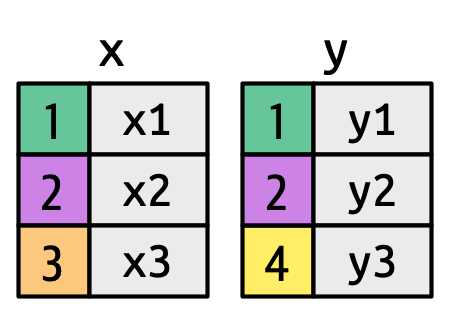
key columns map background color to key value. The grey columns represent the “value” columns that are carried along for the ride.
Figure 19.3 展示了我们可视化表示的基础。 它显示了 x 和 y 之间所有可能的匹配,即从 x 的每一行和 y 的每一行绘制的线条的交集。 输出中的行和列主要由 x 决定,因此 x 表是水平的,并与输出对齐。
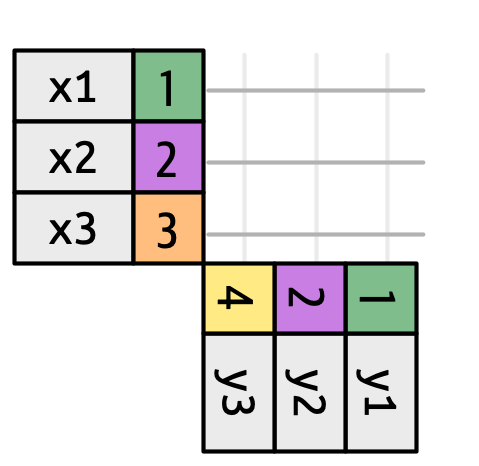
为了描述特定类型的连接,我们用点表示匹配。 匹配决定了输出中的行,输出是一个包含键、x 值和 y 值的新数据框。 例如,Figure 19.4 显示了一个内连接,其中仅当键相等时才保留行。
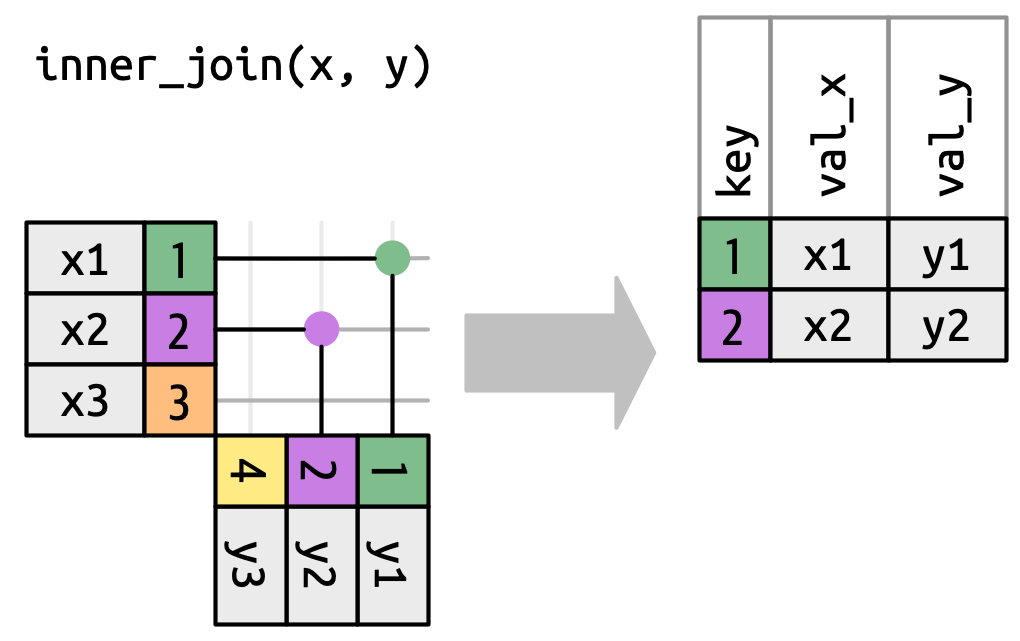
x to the row in y that has the same value of key. Each match becomes a row in the output.
我们可以应用相同的原理来解释外连接,这些连接保留出现在至少一个数据框中的观测。 这些连接通过向每个数据框添加一个额外的“虚拟”观测来实现。 该观测有一个键,仅当没有其他键匹配时才会匹配,并且值用 NA 填充。 外连接有三种类型:
-
左连接(left join)保留
x中的所有观测(Figure 19.5)。x的每一行都保留在输出中,因为它可以回退到与y中的一行NAs 匹配。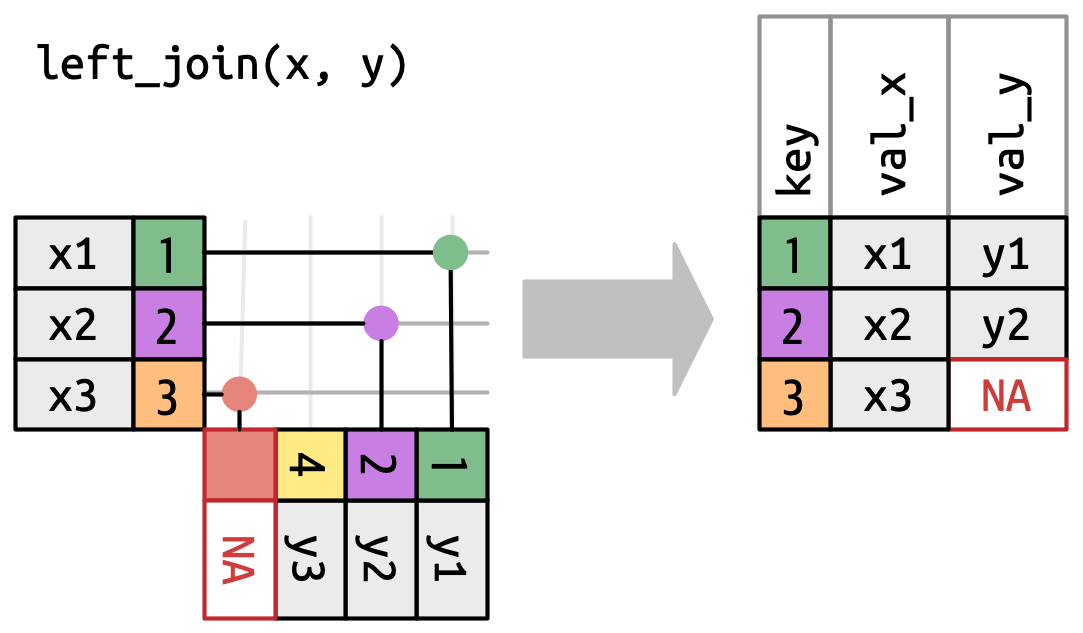
Figure 19.5: A visual representation of the left join where every row in xappears in the output. -
右连接(right join)保留
y中的所有观测(Figure 19.6)。y的每一行都保留在输出中,因为它可以回退到与x中的一行NA匹配。 输出仍然尽可能与x匹配;来自y的任何额外行都会添加到末尾。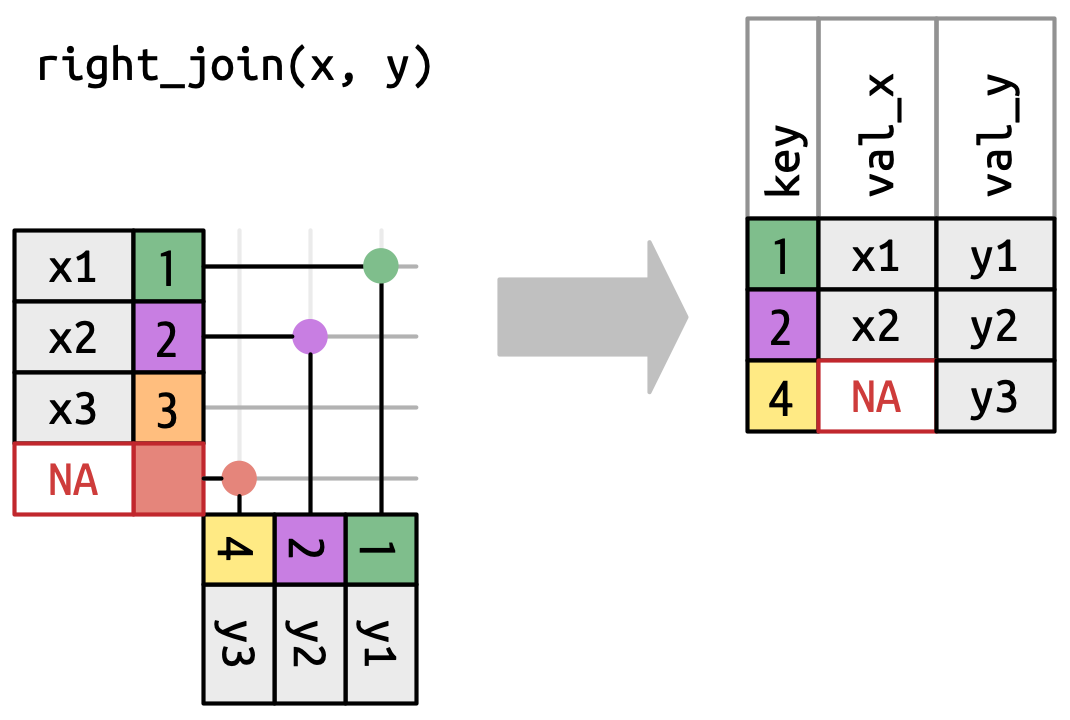
Figure 19.6: A visual representation of the right join where every row of yappears in the output. -
全连接(full join)保留出现在
x或y中的所有观测(Figure 19.7)。x和y的每一行都包含在输出中,因为x和y都有一个回退的NA行。 同样,输出从x的所有行开始,然后是剩余未匹配的y行。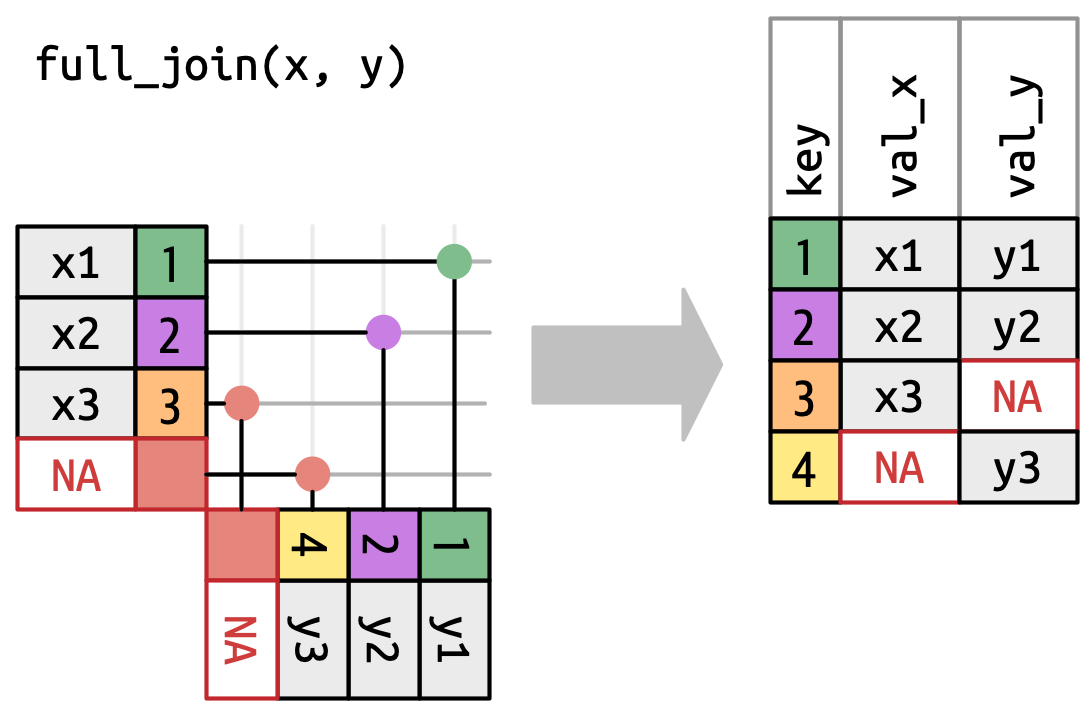
Figure 19.7: A visual representation of the full join where every row in xandyappears in the output.
另一种展示不同类型外连接差异的方式是使用维恩图,如 Figure 19.8 所示。 然而,这并不是一个很好的表示方式,因为它可能只能唤起你对哪些行被保留的记忆,但无法说明列发生了什么变化。
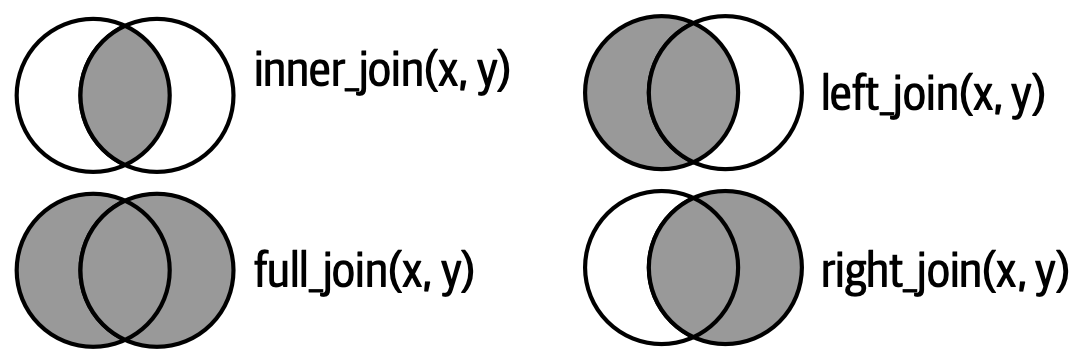
这里展示的连接是所谓的等值连接,即当键相等时行匹配。 等值连接是最常见的连接类型,因此我们通常会省略“等值”前缀,直接说“内连接”而不是“等值内连接”。 我们将在 Section 19.5 中讨论非等值连接。
19.4.1 Row matching
到目前为止,我们探讨了当 x 中的一行匹配 y 中的零行或一行时会发生什么。 如果它匹配多于一行会怎样呢? 为了理解其中的情况,我们先缩小范围到 inner_join(),然后绘制一张图,如 Figure 19.9 所示。
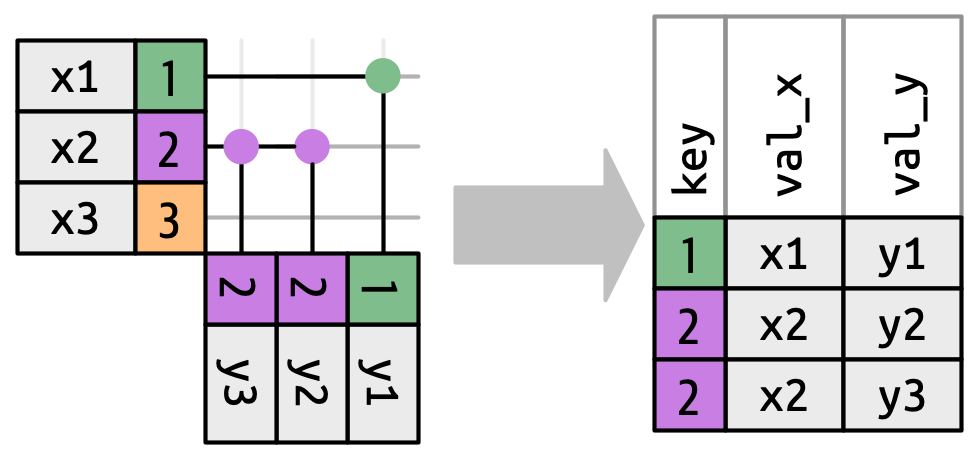
x can match. x1 matches one row in y, x2 matches two rows in y, x3 matches zero rows in y. Note that while there are three rows in x and three rows in the output, there isn’t a direct correspondence between the rows.
对于 x 中的一行,有三种可能的结果:
- 如果它没有匹配到任何行,它将被丢弃。
- 如果它匹配到
y中的一行,它将被保留。 - 如果它匹配到
y中的多行,它会为每个匹配重复一次。
原则上,这意味着输出中的行与 x 中的行之间没有保证的对应关系,但在实践中,这很少引起问题。 然而,有一种特别危险的情况可能导致行数的组合爆炸。 想象一下连接以下两个表:
虽然 df1 中的第一行只匹配 df2 中的一行,但第二行和第三行都匹配两行。 这有时被称为 many-to-many 连接,dplyr 会发出警告:
df1 |>
  inner_join(df2, join_by(key))
#> Warning in inner_join(df1, df2, join_by(key)): Detected an unexpected many-to-many relationship between `x` and `y`.
#> ℹ Row 2 of `x` matches multiple rows in `y`.
#> ℹ Row 2 of `y` matches multiple rows in `x`.
#> ℹ If a many-to-many relationship is expected, set `relationship =
#>   "many-to-many"` to silence this warning.
#> # A tibble: 5 × 3
#>     key val_x val_y
#>   <dbl> <chr> <chr>
#> 1     1 x1    y1
#> 2     2 x2    y2
#> 3     2 x2    y3
#> 4     2 x3    y2
#> 5     2 x3    y3
如果你是有意这样做的,可以按照警告的建议,设置 relationship = "many-to-many"。
19.4.2 Filtering joins
匹配的数量也决定了筛选连接的行为。 半连接保留 x 中在 y 中有一个或多个匹配的行,如 Figure 19.10 所示。 反连接保留 x 中在 y 中匹配零行的行,如 Figure 19.11 所示。 在这两种情况下,重要的是匹配是否存在;匹配多少次并不重要。 这意味着筛选连接永远不会像变异连接那样重复行。
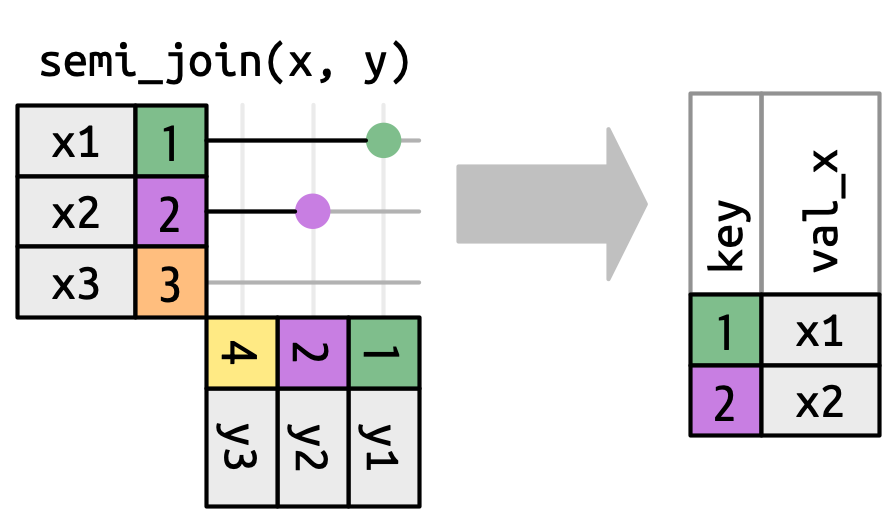
y don’t affect the output.
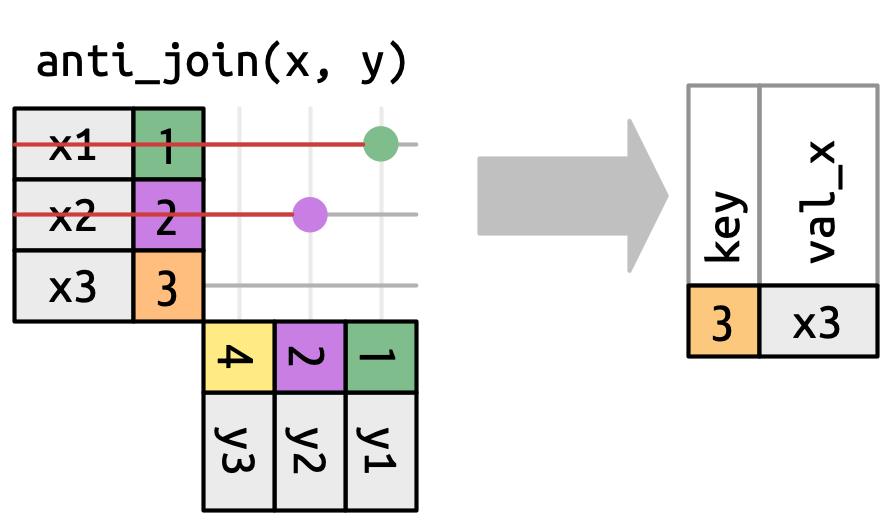
x that have a match in y.
19.5 Non-equi joins
到目前为止,你只见过等值连接,即当 x 键等于 y 键时行匹配的连接。 现在我们将放宽这个限制,讨论其他确定一对行是否匹配的方法。
但在我们这样做之前,我们需要重新审视之前的一个简化。 在等值连接中,x 键和 y 键总是相等的,因此我们只需要在输出中显示一个键。 我们可以要求 dplyr 用 keep = TRUE 保留两个键,导致下面的代码和在 Figure 19.12 中重新绘制的 inner_join()。
x |> left_join(y, by = "key", keep = TRUE)
#> # A tibble: 3 × 4
#>   key.x val_x key.y val_y
#>   <dbl> <chr> <dbl> <chr>
#> 1     1 x1        1 y1
#> 2     2 x2        2 y2
#> 3     3 x3       NA <NA>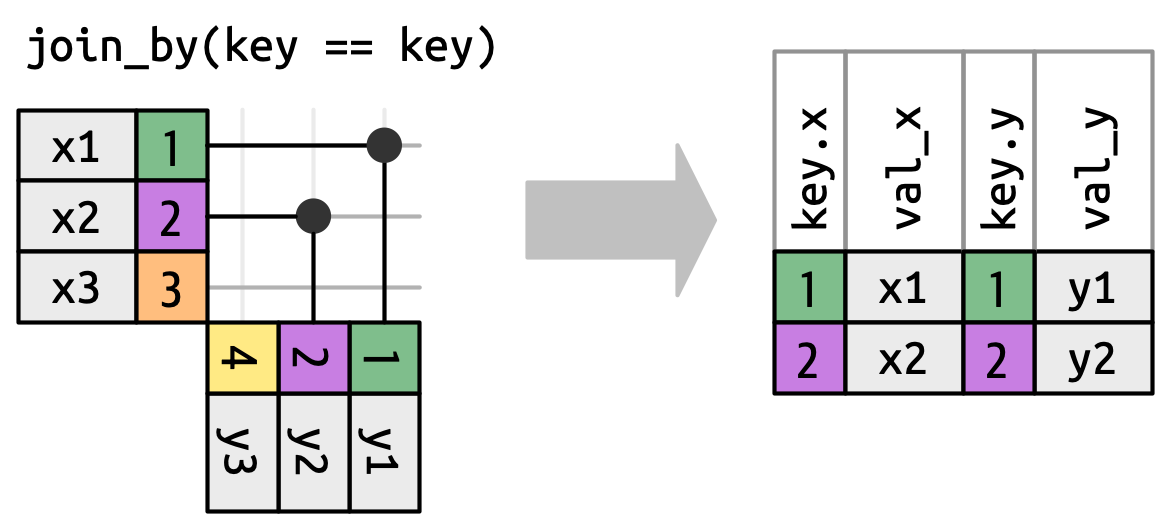
x and y keys in the output.
当我们离开等值连接时,我们将总是显示两个键,因为键值通常会不同。 例如,我们不再仅仅在 x$key 和 y$key 相等时匹配,而是在 x$key 大于或等于 y$key 时匹配,导致 Figure 19.13。 dplyr 的连接函数理解等值连接和非等值连接之间的区别,因此当你执行非等值连接时,它总是显示两个键。
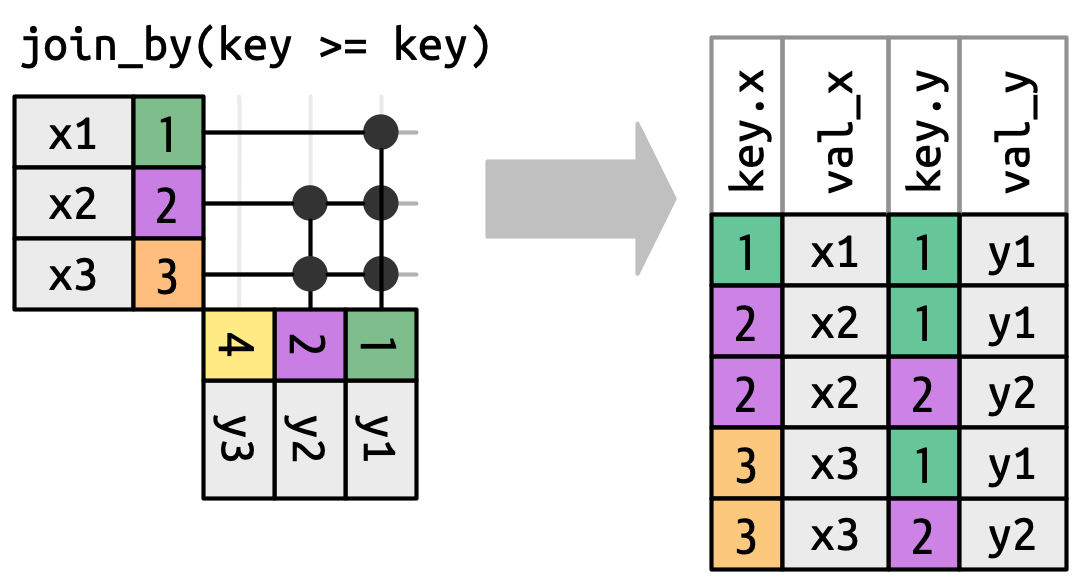
x key must be greater than or equal to the y key. Many rows generate multiple matches.
“非等值连接”并不是一个特别有用的术语,因为它只告诉你连接不是什么,而不是它是什么。d plyr 通过识别四种特别有用的非等值连接类型来提供帮助:
- 交叉连接(Cross joins)匹配每一对行。
- 不等式连接(Inequality joins)使用
<,<=,>和>=而不是==。 - 滚动连接(Rolling joins)类似于不等式连接,但只找到最接近的匹配。
- 重叠连接(Overlap joins)是一种特殊类型的不等式连接,设计用于处理范围。
以下各节将更详细地描述这些类型。
19.5.1 Cross joins
交叉连接会匹配所有内容,如 Figure 19.14 所示,生成行的笛卡尔积。 这意味着输出将有 nrow(x) * nrow(y) 行。
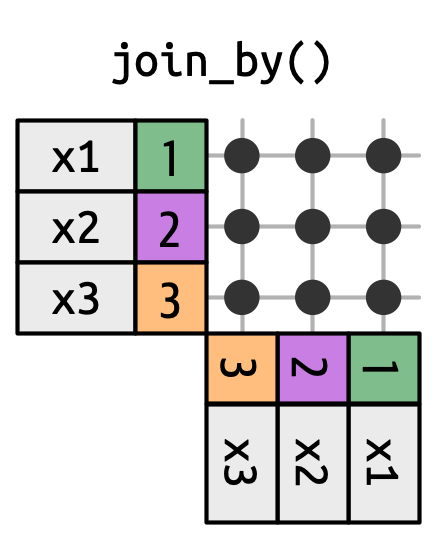
x with every row in y.
交叉连接在生成排列组合时很有用。 例如,下面的代码生成了所有可能的名字对。 由于我们将 df 与自身连接,这有时被称为自连接。 交叉连接使用不同的连接函数,因为当匹配每一行时,内/左/右/全连接之间没有区别。
df <- tibble(name = c("John", "Simon", "Tracy", "Max"))
df |> cross_join(df)
#> # A tibble: 16 × 2
#>   name.x name.y
#>   <chr>  <chr>
#> 1 John   John
#> 2 John   Simon
#> 3 John   Tracy
#> 4 John   Max
#> 5 Simon  John
#> 6 Simon  Simon
#> # ℹ 10 more rows
19.5.2 Inequality joins
不等式连接使用 <, <=, >= 或 > 来限制可能的匹配集,如 Figure 19.13 和 Figure 19.15 所示。
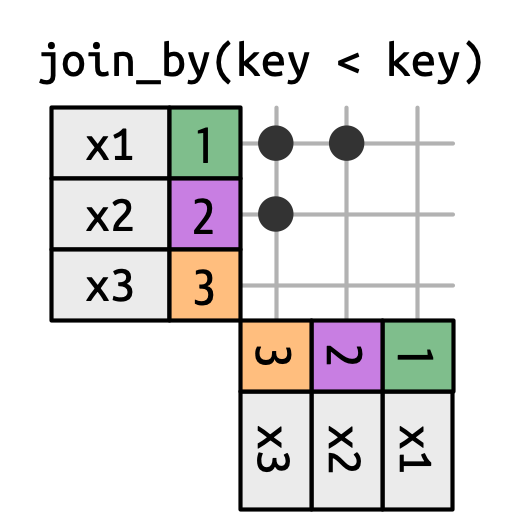
x is joined to y on rows where the key of x is less than the key of y. This makes a triangular shape in the top-left corner.
不等式连接极其通用,通用到很难提出有意义的特定用例。 一个有用的技巧是使用它们来限制交叉连接,从而生成所有组合而非所有排列:
df <- tibble(id = 1:4, name = c("John", "Simon", "Tracy", "Max"))

df |> left_join(df, join_by(id < id))
#> # A tibble: 7 × 4
#>    id.x name.x  id.y name.y
#>   <int> <chr>  <int> <chr>
#> 1     1 John       2 Simon
#> 2     1 John       3 Tracy
#> 3     1 John       4 Max
#> 4     2 Simon      3 Tracy
#> 5     2 Simon      4 Max
#> 6     3 Tracy      4 Max
#> # ℹ 1 more row
19.5.3 Rolling joins
滚动连接是一种特殊类型的不等式连接,它不是获取每个满足不等式的行,而是只获取最接近的行,如 Figure 19.16 所示。 你可以通过添加 closest() 将任何不等式连接转换为滚动连接。 例如,join_by(closest(x <= y)) 匹配大于或等于 x 的最小 y,而 join_by(closest(x > y)) 匹配小于 x 的最大 y。
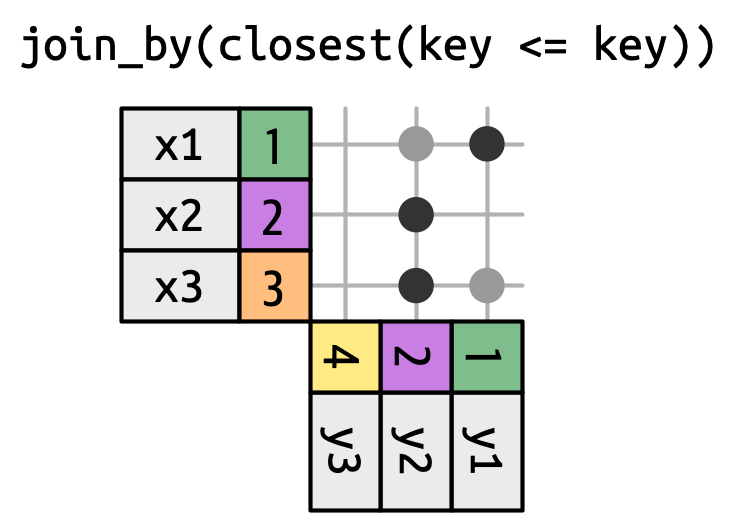
当你有两个日期不完全对齐的表,并且想找到表 1 中最接近表 2 中某个日期之前(或之后)的日期时,滚动连接特别有用。
例如,假设你负责公司的派对策划委员会。 你的公司相当节俭,因此不举办单独的派对,而是每季度只举办一次。 确定派对举行时间的规则有些复杂:派对总是在周一举行,一月的第一周因很多人休假而跳过,2022年第三季度的第一个周一是7月4日,因此必须推迟一周。 这导致了以下派对日期:
现在假设你有一个员工生日表:
employees <- tibble(
  name = sample(babynames::babynames$name, 100),
  birthday = ymd("2022-01-01") + (sample(365, 100, replace = TRUE) - 1)
)
employees
#> # A tibble: 100 × 2
#>   name    birthday
#>   <chr>   <date>
#> 1 Case    2022-09-13
#> 2 Shonnie 2022-03-30
#> 3 Burnard 2022-01-10
#> 4 Omer    2022-11-25
#> 5 Hillel  2022-07-30
#> 6 Curlie  2022-12-11
#> # ℹ 94 more rows
我们想为每位员工找到生日之后(或当天)的第一个派对日期。 我们可以用滚动连接来表达这一点:
employees |>
  left_join(parties, join_by(closest(birthday >= party)))
#> # A tibble: 100 × 4
#>   name    birthday       q party
#>   <chr>   <date>     <int> <date>
#> 1 Case    2022-09-13     3 2022-07-11
#> 2 Shonnie 2022-03-30     1 2022-01-10
#> 3 Burnard 2022-01-10     1 2022-01-10
#> 4 Omer    2022-11-25     4 2022-10-03
#> 5 Hillel  2022-07-30     3 2022-07-11
#> 6 Curlie  2022-12-11     4 2022-10-03
#> # ℹ 94 more rows
然而,这种方法有一个问题:生日在1月10日之前的员工没有分配到派对:
为了解决这个问题,我们需要用另一种方式处理,即使用重叠连接。
19.5.4 Overlap joins
重叠连接提供了三个辅助函数,它们利用不等式连接来更便捷地处理区间:
-
between(x, y_lower, y_upper)是x >= y_lower, x <= y_upper的简写. -
within(x_lower, x_upper, y_lower, y_upper)是x_lower >= y_lower, x_upper <= y_upper的简写. -
overlaps(x_lower, x_upper, y_lower, y_upper)是x_lower <= y_upper, x_upper >= y_lower的简写.
我们继续生日示例,看看如何使用它们。 我们之前使用的策略有一个问题:1月1日至9日的生日没有对应的派对。 因此,最好明确每个派对涵盖的日期范围,并为这些早期生日设置特殊处理:
parties <- tibble(
  q = 1:4,
  party = ymd(c("2022-01-10", "2022-04-04", "2022-07-11", "2022-10-03")),
  start = ymd(c("2022-01-01", "2022-04-04", "2022-07-11", "2022-10-03")),
  end = ymd(c("2022-04-03", "2022-07-11", "2022-10-02", "2022-12-31"))
)
parties
#> # A tibble: 4 × 4
#>       q party      start      end
#>   <int> <date>     <date>     <date>
#> 1     1 2022-01-10 2022-01-01 2022-04-03
#> 2     2 2022-04-04 2022-04-04 2022-07-11
#> 3     3 2022-07-11 2022-07-11 2022-10-02
#> 4     4 2022-10-03 2022-10-03 2022-12-31
Hadley 在数据录入方面糟糕透顶,他还想检查派对时段是否重叠。 一种方法是使用自连接来检查任何起止区间是否与其他区间重叠:
parties |>
  inner_join(parties, join_by(overlaps(start, end, start, end), q < q)) |>
  select(start.x, end.x, start.y, end.y)
#> # A tibble: 1 × 4
#>   start.x    end.x      start.y    end.y
#>   <date>     <date>     <date>     <date>
#> 1 2022-04-04 2022-07-11 2022-07-11 2022-10-02
哎呀,确实存在重叠,所以让我们修复这个问题并继续:
现在我们可以为每位员工匹配他们的派对了。 这是一个使用 unmatched = "error" 的好时机,因为我们希望快速发现是否有员工未被分配派对。
employees |>
  inner_join(parties, join_by(between(birthday, start, end)), unmatched = "error")
#> # A tibble: 100 × 6
#>   name    birthday       q party      start      end
#>   <chr>   <date>     <int> <date>     <date>     <date>
#> 1 Case    2022-09-13     3 2022-07-11 2022-07-11 2022-10-02
#> 2 Shonnie 2022-03-30     1 2022-01-10 2022-01-01 2022-04-03
#> 3 Burnard 2022-01-10     1 2022-01-10 2022-01-01 2022-04-03
#> 4 Omer    2022-11-25     4 2022-10-03 2022-10-03 2022-12-31
#> 5 Hillel  2022-07-30     3 2022-07-11 2022-07-11 2022-10-02
#> 6 Curlie  2022-12-11     4 2022-10-03 2022-10-03 2022-12-31
#> # ℹ 94 more rows
19.5.5 Exercises
-
你能解释在这个等值连接中键发生了什么情况吗? 为什么它们会不同?
x |> full_join(y, by = "key")
#> # A tibble: 4 × 3
#>     key val_x val_y
#>   <dbl> <chr> <chr>
#> 1     1 x1    y1
#> 2     2 x2    y2
#> 3     3 x3    <NA>
#> 4     4 <NA>  y3

x |> full_join(y, by = "key", keep = TRUE)
#> # A tibble: 4 × 4
#>   key.x val_x key.y val_y
#>   <dbl> <chr> <dbl> <chr>
#> 1     1 x1        1 y1
#> 2     2 x2        2 y2
#> 3     3 x3       NA <NA>
#> 4    NA <NA>      4 y3
在查找是否有派对时间段与其他派对时间段重叠时,我们在
join_by()中使用了q < q? 为什么? 如果移除这个不等式会发生什么?
19.6 Summary
在本章中,你学习了如何使用变异连接和筛选连接来合并两个数据框的数据。 过程中你学会了如何识别键,以及主键和外键的区别。 你还理解了连接的工作原理,以及如何推断输出将有多少行。 最后,你初步见识了非等值连接的强大功能,并看到了一些有趣的用例。
本章结束了本书的“转换”部分,该部分的重点在于可用于处理单个列和 tibble 的工具。 你学习了用于处理逻辑向量、数字和完整表格的 dplyr 及基础函数,用于处理字符串的 stringr 函数,用于处理日期时间的 lubridate 函数,以及用于处理因子的 forcats 函数。
在本书的下一部分,你将学习更多关于将各类数据以整洁形式导入 R 的知识。